

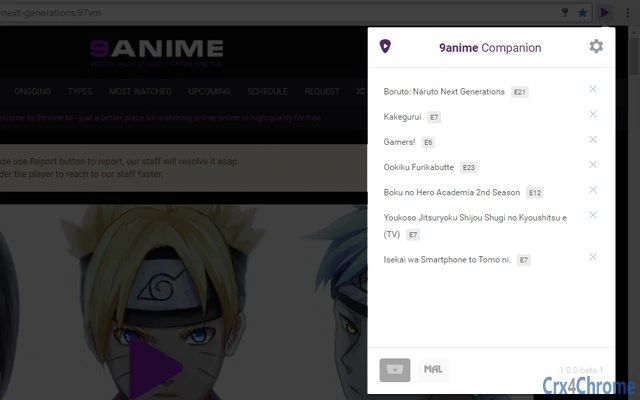
Description
Enhance Your 9anime Experience with 9anime Companion
Overview
9anime Companion is a browser extension designed to enhance the functionality and usability of the 9anime streaming platform. Built to streamline the anime-watching experience, it introduces a suite of practical tools tailored for fans who frequently visit 9anime. The software addresses common frustrations such as intrusive ads, fragmented episode navigation, and the lack of personalized tracking features. By integrating seamlessly with the site, it allows users to manage their viewing sessions more efficiently, reducing distractions and improving accessibility.
Targeted primarily at anime enthusiasts and frequent visitors to 9anime, the extension serves both casual viewers and dedicated fans who want a cleaner, more intuitive browsing environment. Its open-source nature, backed by the MIT License, promotes transparency and community-driven development. The developer, lap00zza, has made the project publicly available on GitHub, inviting contributions and feedback from users. Real-world use cases include organizing watched episodes, downloading multiple episodes at once, and integrating with MyAnimeList for tracking progress—all without leaving the browser.
Key Features & Capabilities
- Ad and Popup Removal: Eliminates disruptive ads and popups, providing a cleaner viewing interface.
- Batch Episode Downloading: Enables users to download all episodes of a series in one action, saving time and effort.
- MyAnimeList Integration: Syncs watch status and progress with MyAnimeList, allowing users to track their viewing history across platforms.
- Utility Bar: Offers quick access to frequently used tools and settings directly from the browser interface.
- Recently Watched List: Maintains a record of recently viewed episodes for easy resumption.
- Page Element Toggle: Allows users to hide or show elements like comments and related content sections to reduce clutter.
- Keyboard Shortcuts: Provides customizable shortcuts such as
sfor alternate search overlay andtfor fast scrolling to the video player. - Privacy-First Data Storage: MyAnimeList credentials are stored locally using
chrome.storage.localand are not transmitted externally.
These features collectively improve workflow efficiency by minimizing manual navigation and reducing interruptions. For example, users can quickly jump to the player with a single keypress or hide distracting content sections while focusing on a specific episode. The extension’s design prioritizes usability, making it ideal for users who value speed, privacy, and customization in their anime streaming routine.
User Interface, Workflow & Performance
The user interface of 9anime Companion is minimal and context-aware, integrating directly into the 9anime website without altering its core layout. The utility bar appears seamlessly within the browser environment, offering intuitive access to tools without overwhelming the user. Navigation is straightforward, relying on standard browser extension management panels and in-page controls. The workflow is designed to be non-intrusive, allowing users to retain full control over their browsing experience.
Performance is optimized for responsiveness, with features activated on demand to minimize overhead. The extension operates efficiently within the browser’s runtime environment, leveraging modern web APIs for smooth execution. The developer did not specify resource usage details, but based on its lightweight footprint and modular design, it is expected to have low CPU and RAM consumption. Stability appears to be maintained through regular updates and community testing. No performance bottlenecks were reported in publicly available issue logs.
Compatibility & System Requirements
9anime Companion is compatible with major desktop operating systems, including Windows, Mac, and Linux. It is designed to work with modern web browsers that support Chrome extensions, such as Google Chrome, Microsoft Edge, and other Chromium-based browsers. The installation size is 2.4 MB, indicating a lightweight deployment with minimal disk footprint.
Exact system requirements were not listed. However, since the extension relies on browser runtime capabilities, users are expected to have a supported browser version installed. The extension does not require additional software or drivers. Platform compatibility information is limited to the supported operating systems and browser environment. No specific hardware requirements were provided.
Pros and Cons
Pros
- Free and open-source under the MIT License
- Enhances 9anime with essential usability improvements
- Privacy-focused design with local-only data storage
- Efficient batch downloading and episode management
- Intuitive keyboard shortcuts for faster navigation
- Seamless MyAnimeList integration for tracking
- Regular updates and active community support
Cons
- Requires manual installation from GitHub or extension store
- Limited to Chromium-based browsers
- No official support for non-Chromium browsers
- Dependent on 9anime’s website structure (may break if site changes)
- Advanced features may require user configuration
FAQ Section
Is 9anime Companion free to use?
Yes, 9anime Companion is completely free and released under the MIT License. There are no paid features or hidden costs.
Does the extension collect my personal data?
No. If you use the MyAnimeList integration, your login information is stored locally using chrome.storage.local and is not transmitted to any external server.
Can I install this extension on any browser?
It is designed for Chromium-based browsers such as Google Chrome, Microsoft Edge, and others. It is not compatible with Firefox or Safari unless ported by the community.
How do I update the extension?
Updates are managed through the browser’s extension store. If installed via GitHub, users must manually re-download and reinstall the latest version.
Is the extension safe to use?
Yes, the extension is open-source, allowing users to inspect the code. It does not contain malware or tracking scripts. However, always download from official sources like GitHub or the official extension store.
Final Thoughts + CTA
9anime Companion delivers a powerful, privacy-conscious enhancement to the 9anime platform. With its focus on usability, customization, and transparency, it stands out as a must-have tool for anime fans who value efficiency and control. The combination of ad removal, batch downloads, and MyAnimeList integration makes it a significant upgrade over the base experience. While it has limitations in browser compatibility and relies on the stability of 9anime’s site, its active development and open-source model ensure long-term viability.
For users seeking a cleaner, faster, and more personalized anime streaming experience, 9anime Companion offers real value. Download 9anime Companion now to unlock a smarter way to watch anime.
Guides & Tutorials for 9anime Companion Extension for Chrome
How to install 9anime Companion Extension for Chrome
- Click the Preview / Download button above.
- Once redirected, accept the terms and click Install.
- Wait for the 9anime Companion Extension for Chrome download to finish on your device.
How to use 9anime Companion Extension for Chrome
This software is primarily used for its core features described above. Open the app after installation to explore its capabilities.
User Reviews for 9anime Companion Extension for Chrome 0
No reviews found





